RSS
Facebook
Twitter

Saturday, 30 November 2013


က်ြန္ေတာ္ ဒီပိုစ့္မွာ Huawei Y300 ကို Root လုပ္နည္းကိုတင္ျပေပးလိုက္ပါ။ေတာင္းဆိုထားတဲ့ သူငယ္ခ်င္း ေတြအေၾကာင္းအမိ်ဳးမ်ိဳးေၾကာင့္ပိုစ့္တင္မႈ႕ေနာက္က်ရင္နားလည္ေပးပါ။
ေအာက္မွာ Huawei Y300 အတြက္ step by step ရွင္းျပထားပါတယ္ေသခ်ာၾကည့္ေပးပါ။
ဒါကေတာ့ Huawei Y300 ရဲ႕ hardware versions ေတြပါ....
  1. Huawei Y300 (T8833) -  TD-SCDMA / China Mobile
  2. Huawei Y300-0000 (U8833) - WCDMA China Unicom
  3. Huawei Y300-0100 (U8833) - WCDMA International
  4. Huawei Y300-0151 (U8833) - WCDMA Extra Frequency
လိုအပ္တာေတြကေတာ့...
  • Huawei Y300-0000 / Y300-0100 / Y300-0151
  • Windows PC
  • Y300 Root Tools & Huawei USB driver - Download 1.4
Unlock the bootloader အတြက္ သူ႕ရဲ႕မူရင္း Huawei Y300 ဆိုဒ္မွာ သြားလုပ္လို႔ရပါတယ္။
Y300-0000: Visit this website  Chinese language အတြက္ Google translator ကိုအသံုးျပဳျပီး
မိမိ  model ေရြးလို႔ရပါတယ္။ ဒါကေတာ့  Huawei website ပါ။

အဲ့ဒီ့မွာသြားလုပ္ရင္ေတာ့ unlock code ကို e-mail မွတဆင့္ျပန္ပို႕ပါတယ္။ Wait 2-3 days ပါ။
ျပီးရင္ေအာက္ကအဆင့္ေတြျဖည့္ေပးရပါတယ္..

  • S/N number (written on the label under the battery)
  • IMEI (Settings -> About phone -> Status) 
  • Product ID (dial *#*#1357946#*#*)


Unlock the bootloader

က်ြနိေတာ္ေအာက္မွာစလိုက္ၾကရေအာင္... သူငယ္ခ်င္းဖုန္းက  Huawei Y300 ေသခ်ာျပီဆိုရင္..
1) ဖုန္းကို Settings  -> Developer Options and make sure USB debugging လုပ္ထားပါ။
2) ျပီးရင္ အေပၚမွာ Downloaded package Y300-AiO-ROOT-v1.3.zip  ကို  Desktop ေပၚမွာထားပါ
3) Huawei_Y300_drivers.exe ကို Install  လုပ္ပါ ေဒါင္းေလာ့စ္ဆြဲထားတဲ့ ဖိုင္ထဲမွာ
“MobilePhoneDrivers” ဆိုတာရွိပါတယ္။
4) Turn off your phone, remove the battery, wait 5 seconds.
5) ျပီးရင္ battery ျပန္ထည့္ပါ။
6)  Volume DOWN button pressed for at least 10 seconds. Your phone should freeze on the splash screen (fastboot mode).
7) အိုေက ဒါဆိုရင္သူငယ္ခ်င္းရဲ႕ဖုန္းကို computer နဲ႔ခ်ိတ္ဆက္လိုက္ပါ။ Computer မွာ new device
ေတြ႔ရပါမယ္။
8) ျပီးရင္ေဒါင္းေလာ့စ္ဆြဲထားတဲ့ ဖိုင္ထဲကေန “UnlockTools” ကိုဖြင့္လိုက္ပါ။ ျပီးရင္ check_bootloader.bat   ဆိုတာကို double click လုပ္ပါ။ ခဏေစာင့္ပါ သူအလုပ္လုပ္ေနပါတယ္။
9) From the same folder double click unlock_bootloader.bat and when prompted enter the 16-digits unlock code you received from Huawei.
10) The phone will execute some checks, restore factory settings and finally reboot (this may take while)

display “Bootloader Lock State: Unlocked”
 

Flash custom recovery

TWRP v2.5 custom recovery for Y300 information on the developers page.
  1. Turn off your phone, remove the battery, wait 5 seconds ျပီးရင္ battery ကိုျပန္ထည့္ပါ။
  2.  Volume DOWN button pressed for at least 10 seconds. Your phone should freeze on the splash screen (fastboot mode).
  3. Connect your phone to your computer.
  4. From the folder “UnlockTools” run flash_recovery.bat and follow the steps.
  5. When the recovery has been flashed successfully, your phone will reboot (this may take a while).

Flash SuperSU tool

Finally we will install the latest SuperSU tool.
1) “SuperSU-ROOT.zip”  ကို Copy လုပ္ျပီး  SD card ထဲထည့္ပါ။
2) Turn of your phone.
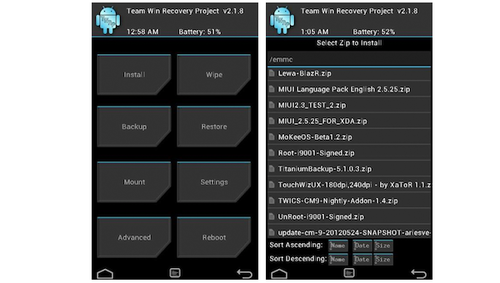
3)  Hold the Volume UP and Power button  TWRP recovery menu is displayed.
4) TWRP menu ကေန SD card ထဲမွာရွိတဲ့  ”SuperSU-ROOT.zip” ကို “Install” လုပ္ပါမယ္။
5) Install ျပီးသြားရင္ “Reboot system” ကိုေရြးပါ။ reboot your phone.
All Done! If there is a SuperSU icon on your phone, it means the root process was successfull.
အားလံုးအဆင္ေျပၾကပါေစ။  

မွက္ခ်က္။ ။ Root / Rom/Recovery/Frimware/reset to factory  စသည္တို႔ျပဳလုပ္ျခင္းသည္
ျပဳလုပ္သူ၏က်ြမ္းက်င္မႈ 50% ပါ၀င္ပါေသာေၾကာင့္ အေၾကာင္းအမ်ိဳးမ်ိဳးေၾကာင့္တစ္စံုတရာအမွား
အယြင္းမ်ားရွိပါလၽွ်င္ ပိုစ့္တင္သူမွတာ၀န္ယူေျဖရွင္းေပးမည္မဟုတ္ပါ။

က်ြန္ေတာ္တင္သမွ်ပိုစ့္ေတြ Facebook ကေနရယူခ်င္တယ္ဆိုရင္ ဒီမွာ Like ႏွိပ္ပါ 


                                       www.mm-knowledge.com

                                              နည္းပညာၿမိဳ႕ေတာ္


Huawei Ascend P1 ကိုယ္ဘယ္လို Root လုပ္လဲဆိုတာေတာင္းဆိုထားလို႔တင္ေပးလိုက္ပါတယ္။
အလြယ္ကူဆံုးနည္းလမ္းျဖင့္ေဖာ္ျပေပးထားတာပါ။
1) အရင္ဆံုး Download  Root Package နဲ႔  Android SDK Tools ေလးကိုအရင္ေဒါင္းလိုက္ပါ။
2) ေဒါင္းေလာ့စ္ Extract files Desktop ေပၚမွာထားလိုက္ပါ။
3) USB debugging ကို Turn ON လုပ္ထားပါ။ Menu>>Settings>>Developer options>>USB debugging
4) PC နဲ႕ USB cable ကိုခ်ိတ္ဆက္ထားပါ။
5) ေဒါင္းေလာ့စ္ဖိုင္ထဲက  hwadb.exe ဆိုတာကို Double-click  ႏွိပ္ျပီးဖြင့္လိုက္ပါျပီး ဆံုးတဲ့ အထိေစာင့္ပါ
6) ျပီးရင္  ubl.exe  ကို double-click ထပ္လုက္ပါ။ သူ႔ကိုလည္းျပီးတဲ့အထိေစာင့္ပါ finishes ထိေနာ္။
7) ျပီးရင္ ဖုန္းကိုကြန္ျပဴတာကေနျဖဳတ္လို႔၇ပါျပီ။
8) Reboot your device
9) And you should be rooted now!
ျပီးရင္  Superuser ေရာက္ေနမွာပါ။ Root Checker ေလးနဲ႔စမ္းၾကည့္ပါ root-access ရမရေပါ့။

Device rooted  လုပ္လို႔ျပီးသြားရင္ recovery install လုပ္ခ်င္ရင္ ေဒါင္းေလာ့စ္ဖိုင္ထဲမွာ ပါတဲ့ "Onekey_ROM_Ascendp1.exe" install လုပ္လိုက္ပါ။


ေနာက္တစ္ေခါက္ၾကရင္  Huawei Ascend P1 မွာ Flash a Custom Recovery Image ဘယ္လိုလုပ္
လဲဆိုတာ တင္ျပပါအုန္းမယ္။

မွက္ခ်က္။ ။ Root / Rom/Recovery/Frimware/reset to factory  စသည္တို႔ျပဳလုပ္ျခင္းသည္
ျပဳလုပ္သူ၏က်ြမ္းက်င္မႈ 50% ပါ၀င္ပါေသာေၾကာင့္ အေၾကာင္းအမ်ိဳးမ်ိဳးေၾကာင့္တစ္စံုတရာအမွား
အယြင္းမ်ားရွိပါလၽွ်င္ ပိုစ့္တင္သူမွတာ၀န္ယူေျဖရွင္းေပးမည္မဟုတ္ပါ။ your own risk.


က်ြန္ေတာ္တင္သမွ်ပိုစ့္ေတြ Facebook ကေနရယူခ်င္တယ္ဆိုရင္ ဒီမွာ Like ႏွိပ္ပါ 


                                                Download  Root Package

http://dl-5.one2up.com/onetwo/content/2013/11/30/2af2d81e727e70822582048777d9bfce.rar

                                                Android SDK Tools

http://dl-1.one2up.com/onetwo/content/2013/11/30/fb975dbd3f7fefc514eb8c130f87cd9a.exe 
နည္းပညာၿမိဳ႕ေတာ္


Google Play ျမန္မာႏိုင္ငံကို မဖြင့္ေပးခင္တုန္းကအသံုးမ်ားခဲ႕တဲ႕
black market ေလးပါ ကၽြန္ေတာ္က အခုအခ်ိန္ထိသံုးေနဆဲပါ
ဘာေၾကာင့္္လဲဆိုေတာ့ Google Play က လိုင္းေကာင္းမွေဒါင္းရတာ
ေနာက္ၿပီး သူနဲ႕ေဒါင္းၿပီး install လုပ္ထားတဲ႕ေဆာ့၀ဲေတြဆို
အင္တာနက္ဖြင့္ရင္ update လုပ္ရတာနဲ႕ noti တက္ရတာနဲ႕ စိတ္ညစ္တယ္
မသံုးဘူး Google play ကို အဲဒါေၾကာင့္ Black Market အသစ္ေလးထြက္လို႕
တင္ေပးလိုက္ပါတယ္ 

<<<Download Here>>>

<<<Download Here>>>


 Text Plusနဲ့ Yuilopကိုသုံးၿပီး Phone number Lockက်ေနတဲ့ Facebookအေကာင့္ဖြင့္နည္းကို အရင္ရက္ကကြ်န္ေတာ္တင္ေပးခဲ့ပါတယ္။ အဲဒီနည္းက အၿခားႏုိင္ငံေတြမွာ 
အဆင္ေၿပေနေပမဲ့ ၿမန္မာႏုိင္ငံမွာေတာ့ Text Plusကို Yuilopကုိ Comfirm Code 
ၿပန္မပုိ့ေတာ့ အားလုံး အဆင္မေၿပၿဖစ္ၾကတာမ်ားပါတယ္။ ဒီအတြက္ ဒီနည္းကုိ စတင္ရွာေဖြေတြ့ရွိခဲ့ 
သဇင္ကုိကုိ ကုိယ္တုိင္ အဆင္ေၿပေအာင္
ၿပန္လည္ေရးေပးထားတဲ့ စာအုပ္ေလးဘဲၿဖစ္ပါတယ္။ Comfirm Code မရဘူးဆုိသူမ်ား ဒီစာအုပ္ေလးဖတ္ၿပီးလုပ္ၾကည့္ပါ။ အဆင္ေၿပပါလိမ့္မည္။အားလုံးဒီစာအုပ္ေလးဖတ္ၾကည့္
Facebook Phone number lockက်ေနသူအားလုံး အဆင္ေၿပၾကပါေစ........
ေအာက္မွာေဒါင္းယူႏုိင္ပါတယ္ခင္ဗ်ာ......... 

<<<Download Here>>>


<<<Download Here>>>


http://uimg.in/images/2013/03/03/REbLc.jpg

ဒီညမွာေတာ့ ေဘာ္ဒါေတြအတြက္ အသံုး၀င္ေစမယ့္ Recovery Software ေကာင္းေကာင္းေလးတစ္ခု တင္ေပးလိုက္ပါတယ္ဗ်ာ။ Data ေတြကို အေၾကာင္းအမ်ိဳးမ်ိဳးေၾကာင့္ ပ်က္စီး ဆံုးရႈံုးသြားျပီဆိုရင္ေတာ့ေနာက္ ဆံုးေမွ်ာ္လင့္ခ်က္က Recovery ပါဘဲ။ ဒီေကာင္ေလးကလည္း ကၽြန္ေတာ္စမ္းၾကည့္တာအဆင္ေျပလို႕ပါ။ စမ္းျပီး Exexl ဖုိင္ေတြ jpg ေတြ ၊ PDF ေတြကိုဖ်က္ျပီး Recovery လုပ္ၾကည့္တာ Data ေတြျပန္ရပါတယ္။ Hard Disk , USB , Memory Card အစရွိတဲ့ အထဲက Data ေတြကိုျပန္ယူေပးႏိုင္တယ္လို႕ဆိုထားပါတယ္ဗ်ာ။ FAT , NTSF , EXFAT စတဲ႕ System ေတြအားလံုးမွာ အလုပ္လုပ္ပါတယ္။ အျမဲတမ္းသံုးႏိုင္ေအာင္ Full Version အျဖစ္ Serial Key ကိုပါထည့္ေပးလိုက္ပါတယ္ဗ်ာ။

Aidfile Recovery Software Professional is a powerful tool in the recovery of deleted files. Applications with good size and speed up the scanning and retrieving large files so it can help users to restore deleted files.

Can return a certain percentage of the data.
systems files FAT, NTFS and EXFAT in different memory devices are supported and the user can have with this type of system configuration files to retrieve information. Working with Aidfile Recovery Software for its simple but attractive interface and menus have been specifically designed to be extremely simple.

Features Aidfile Recovery Software :

Recover deleted files from any cause
Recover data from formatted drives, even after Windows reinstallation
Restore data after partition changes
Consistency with three file systems FAT, NTFS and EXFAT
Compatibility with multiple formats in a variety of fields to retrieve
Full coordination with all types of hard disk drives, flash memory, floppy disks and ...
Finally the efficiency of retrieving files
There are four different modes of file recovery
Compatible with different versions of Windows.

IDM VERSION 6.18 BUILD 9 + PATCH


Internet Download Managerကေတာ့ အထူးတလည္ မိတ္ဆက္စရာမလုိေအာင္ကုိ ေတာ္ေတာ္မ်ားမ်ား
သိၾကသလုိ အသုံးလည္း ၿပဳၾကပါတယ္။ အခုလည္း IDM version 6.18 build 9ေလးေတြ့လုိ့ Patch
ဖုိင္နဲ့အတူတင္ေပးလုိက္ပါတယ္။ ဖုိင္ဆုိဒ္က 5.6Mb ဘဲရွိပါတယ္။
 ေအာက္မွာေဒါင္းယူႏုိင္ပါတယ္။

<<<Download Here>>>

<<<Download Here>>>


မိတ္ေဆြတို႔ရဲ႕ ကြန္ပ်ဳတာကို အၿမဲတမ္းသြက္လက္ေနေစဖို႔ ရွင္းလင္းေရးလုပ္ေပးမယ့္ Wise Care 365 Pro ေလးပါ။။ သံုးရတာလြယ္ကူၿပီး အင္မတန္ထိေရာက္တဲ့ ေဆာ့ဝဲလ္ေကာင္းေလးပါ
ဖိုင္ဆိုဒ္လည္းေသးပါတယ္ ေဆာင္ထားသင့္တဲ့ ေဆာ့ဝဲလ္ဆိုရင္လည္း မမွားပါဘူး။ လိုခ်င္တဲ့သူမ်ား ေအာက္ကလင့္မွာ ယူသြားလိုက္ပါဗ်ာ သူရဲ႕လုပ္ေဆာင္ခ်က္ေတြ ျပည့္ျပည့္စံုစံုကို ေအာက္မွာဆက္ဖတ္ လိုက္ပါအံုး


What can Wise Care 365 do:


  •     Clean up, defragment and optimize the Windows Registry.
  •     Defragment and free up space on your hard disk.
  •     Protect your privacy by erasing personal tracking data.
  •     Recover lost files.
  •     Hide important files or folders.
  •     Prevent unauthorized use of personal applications.
  •     Auto shut down your PC.
  •     Free up Memory to boost game and enterprise software performance.
  •     Simple "One Click Tune-up" option will optimize your PC.
  •     OS : Windows XP, 2003, 2008, Vista, win 7 and win 8 including 32 and 64 bits.
  •     Language : Multilanguage.

http://www70.zippyshare.com/v/24839990/file.html


ေတာင္းဆိုထားတဲ့ သူငယ္ခ်င္းေတြအတြက္ Free Version ေလးကိုတင္ေပးလိုက္ပါတယ္။
Install လုပ္နည္းကေတာ့သူငယ္ခ်င္းတို႔သိျပီးသားျဖစ္တဲ့အတြက္အထူးမေျပာလိုေတာ့ပါဘူး။
Free စစ္စစ္ေလးျဖစ္တဲ့အတြက္  Win 8 / Win 7 / Vista/ XP အားလံုးအသံဳးျပဳလို႔ရပါတယ္။
ဓါတ္ပံုေတြ ၊ အေခြေတြထဲထည့္ျပီး Slide Shows ဖန္တီးလို႔ရပါတယ္။ ေအာက္မွာပံုေတြနဲ႔ျပထားပါတယ္။
ဒီတစ္ေခါက္မွာေတာ့ပါ၀င္လုပ္ေဆာင္ခ်က္ေတြေတာ္ေတာ္မ်ားပါတယ္။ ဖိုင္ဆိုဒ္ကေတာ့ (190Mb)ရွိတဲ့
အတြက္အားလံုးအဆင္ေျပေအာင္ ဖိုင္ 4 ဖိုင္ခြဲေပးထားပါတယ္။ 1 ဖိုင္မွာ (50Mb) ရွိပါတယ္။
တိုက္ရိုက္ေဒါင္းနိုင္သူေတြအတြက္ တိုက္ရိုက္ေဒါင္းႏိုင္ပါတယ္။ ဘယ္လိုဖိုင္ေတြျပန္ေပါင္းရမယ္ဆိုတာ
မသိေသးသူမ်ားအတြက္ ရွင္းျပေပးထားပါတယ္။  ေဒါင္းေလာ့စ္ဖိုင္ထဲမွာလည္း ဘယ္လို Install လုပ္ရ
မယ္ဆိုတာ ပံုေလးေတြနဲ႔ ထပ္မံျပီးအေသးစိတ္ရွင္းျပေပးထားပါတယ္။


Nero Burning ROM 2014 is the gold-standard disc burning engine. Rip audio CDs; convert audio files; burn and copy reliable and secure CDs, DVDs and Blu-ray Discs(TM); create disc images; or burn DVD-Video, BDMV, and AVCHD compilations. With a huge experience in optimizing CD, DVD and Blu-ray Disc(TM) burning you can rest assured that any disc recorder drive will be supported by Nero and you get the highest quality disc burning every time.
ေနာက္ထပ္ပါ၀င္တဲ့ Features ေတြကေတာ့..

  • Copy CDs, DVDs and Blu-ray Discs™
  • Recording on up to 32 different recorders simultaneously
  • Span large files efficiently across multiple discs, automatically
  • Create auto-starting discs
  • Burn DVD-Video, BDMV, and AVCHD compilations
  • Rip audio CDs and convert music files
  • Copy Audio CDs with CD-Text 

  •  ယေန႔မွစျပီးက်ြန္ေတာ္ဆိုဒ္ကိုလာလည္တဲ့ User ေတြအတြက္ေဒါင္းေလာ့စ္ဆြဲရာတြင္အခက္အခဲမရွိေအာင္
    မည္သည့္ Skip မွၾကားခံထားျခင္းမရွိပါ။ ေဆာ့စ္၀ဲမ်ားကို တိုက္ရိုက္ေဒါင္းႏိုင္ပါတယ္ခင္ဗ်ာ။


            တိုက္ရိုက္ေဒါင္းရန္- ဖိုင္ဆိုဒ္ (190Mb)

    http://dl-16.one2up.com/onetwo/content/2013/12/1/13126c827abddc3e9c22a3c3fedc622e.exe


        ဖိုင္ခြဲ 4 ဖိုင္ 1 ဖိုင္ (50Mb) 
     
     
    Part 1 | Part 2 | Part 3 | Part 4
    နည္းပညာၿမိဳ႕ေတာ္

    Royalty Free Vector Logo Icon of a 3d Blue Arrow Circling an Envelope with an EMail "At Symbol"


    တင္ၿပသူ Kyaw Htin Wednesday, 10 December 2008
    http://www.30gigs.com:
    Storage ပမာဏ 30GB (1GB = 1024MB) ရနုိင္ပါတယ္။
    http://www.aussiemail.com:
    ၾသစေၾတးလ် email service တစ္ခုကေန ေက်ာင္းသားသံုး ရည္ရြယ္ျပီး ဖန္တီးေပးထားတာပါ။
    http://www.aim.com:
    America Online ရဲ႕ service ဟာ အခမဲ့ အသံုးျပဳသူေတြအတြက္ 5GB ပမာဏေပးထားျပီး ေနာင္မွာ unlimited အထိတိုးျမွင့္ေပးပါလိမ့္မယ္။
    http://www.bigstring.com:
    acount အမ်ိဳးမ်ိဳး ခဲြျခားထားျပီး 2GB ကေန 20 GB အထိ သိုမွီးပမာဏ ဖန္တီးေပးထားပါတယ္။ ထူးျခားတဲ့ စနစ္နဲ႕ နည္းပညာကို အသံုးျပဳ တည္ေဆာက္ထားတဲ့အတြက္ အသံုးျပဳသူဟာစိတ္ခ်မ္းသာမွု ရေစပါမယ္လုိ႕ ကတိျပဳထားပါတယ္။
    http://www.bluebottle.com:
    spamေတြကို ကာကြယ္ဖုိ႕ ျမင့္မားတဲ့ tools ေတြကို သံုးစြဲျပီး ေပးပို႕သူနဲ႕လက္ခံသူနွစ္ေယာက္ၾကား မွာရွိတဲ့ ဆက္ဆံေရးကိုမူတည္ျပီး ယံုၾကည္ စိတ္ခ်ရမွုရွိ၊ မရွိ ဆုိတာကိုေတာင္ ေရႊးခ်ယ္ေပးပါတယ္။
    http://www.canada.com:
    ကေနဒါတစ္နိုင္ငံလံုးမွာ သတင္းေမႊးေနတဲ့ Email တစ္ခုပါ။
    http://www.canoe.ca:
    ကေနဒါ service provider တစ္ခုရဲ႕ လိပ္စာပါ။
    http://www.care2.com:
    အခမဲ့ သံုးစဲြနုိင္တဲ့ service တစ္ခုျဖစ္သလုိ user က ယံုၾကည္စိတ္ခ်မွုရွိျပီး သေဘာက်ခဲ့မယ္ဆုိရင္ ေတာ့အလွူေငြ ပါ၀င္လွူဒါန္းနုိင္ပါတယ္။ အဲဒီ ဒါနတရားဟာ ကမာၠတစ္၀န္းလံုးမွာရွိတဲ့ မဖြံ႕ျဖိဳး၊ မတုိးတက္ေသးတဲ့ ေနရာေတြအတြက္ ရည္ရြယ္ပါတယ္။


    http://www.DCEmail.com:
    ၀ါရွင္တန္ဒီစီရဲ႕အခမဲ့၀န္ေဆာင္မွုတစ္ခုပါ။
    http://www.dbzmail.com:
    ကာတြန္းတုိ႕ ပန္းခ်ီတုိ႕နဲ႕ ပက္သက္တဲ့ စီးပြားေရးလုပ္ငန္းေတြ လုပ္ကိုင္တဲ့ “out-blaze” ရဲ႕ service တစ္ခုျဖစ္ပါတယ္။ ကာတြန္းခ်စ္သူေတြ အခ်င္းခ်င္း ဆက္သြယ္ျပီး အျမင္ေတြက္ုိ ဖလွယ္ရင္း ေ၀မွ်ခံစားနုိင္ပါတယ္။
    http://www.DidaMail.com:
    အဂၤလိပ္၊ အာေရဗ် ဒီဇိုင္းနွစ္မ်ိဳးနဲ႕ နွစ္သက္ရာေရြးခ်ယ္နုိင္ျပီး POP3 acount ေတြကို ေပးပိုိနုိင္တယ္ လုိ႕ဆုိပါတယ္။
    http://www.emailaccount.com:
    domain အခြဲေပါင္း ေျမာက္ျမားစြာရွိတဲ့ အခမဲ့၀န္ေဆာင္မွုတစ္ခုပါ။
    http://www.fastmail.fm:
    သိုေလွာင္မွုပမာဏ နည္းပါးေပမယ့္ စာပို႕ျခင္းနဲ႕ လက္ခံယူျခင္းတုိ႕မွာ အလြန္ျမန္ဆန္ျပီး လူၾကိဳက္မ်ားပါတယ္။
    http://www.gawab.com:
    ဘာသာစကား ၁၂ မ်ိဳးေက်ာ္နဲ႕ သံုးစဲြလုိ႕ရတဲ့ 1GB Mail ပါ။
    http://www.Gratfiti.net:
    သိုေလွာင္မွုပမာဏ 100 MB အထိ ေပးထားပါတယ္။
    http://www.hotpop.com:
    online သိုေလွာင္မွု 100 MB ရရွီေစပါတယ္။
    http://www.hushmail.com:
    Email ေတြနဲ႕ ဖိုင္ေတြကို လံုျခံဳမွု၀ွက္စာနဲ႕ ပို႕ေဆာင္ေပးပါတယ္။
    http://www.icqmail.com:
    အခမဲ့ကို 6MB သာ ေပးအပ္ထားေပမယ့္ တျခား IM နဲ႕ အသံုး၀င္တဲ့ features ေတြအမ်ားအျပား ရွိေနပါတယ္။
    http://www.inbox.com:
    5 GB ေပးထားျပီး IMAP ခ်ိတ္ဆက္ ရရွိေစပါတယ္။
    http://ww.indiatimes.com:
    Calendar တစ္ခုနဲ႕ Mail Alert တစ္ခုပါ၀င္ျပီးအိႏၵိယနုိင္ငံရဲ႕ ဘာသာစကား အပါအ၀င္ language ေပါင္း ၁၂ မ်ိဳးနဲ႕ သံုးစြဲနိင္ပါတယ္။
    http://ww.InMail24.com:
    POP3/ IMAP ေတြကို လက္ခ့တဲ့အတြက္ 16 MB သာ ေပးအပ္ထားေပမယ့္ ကိုယ့္ရဲ႕ Email ေတြကို outlook ကေန တစ္ဆင့္ ခ်ိတ္ဆက္လုိ႕ ရနုိင္ပါတယ္။
    http://www.jubli.com:
    ဖိုင္ေတြကို upload တင္လုိ႕ ရသလုိ chat နဲ႕ voip ကိုပါ ေပးအပ္ထားတဲ့ Email ၀န္ေဆာင္မွုတစ္ခုျဖစ္ပါတယ္။
    http://www.linuxmail.org:
    Linux OS ရဲ႕ အဆင္အျပင္နဲ႕ အခမဲ့ service တစ္ခုပါ။
    http://www.litepost.com:
    Alpha (စမ္းသပ္ဆဲ ကာလ) အဆင့္သာရွိေသးေပမယ့္ online ရဲ႕ e-mail သံုးစြဲသူ ေလာကမွာေတာ့သတင္းေမႊးပ်ံ႕လ်က္ရွိပါတယ္။
    http://www.lycosMail.com:
    3 GB ေပးထားျပီး attachments ကိုေတာ့ limit နကန္႕သတ္ဘူးလုိ႕ ေၾကညာထားပါတယ္။
    http://www.hotmail.com:
    Microsoft ကုမၸဏီရဲ႕ ၀န္ေဆာင္မွု တစ္ခုပါ။ စတင္ ယူယူခ်င္းမွာ 250 MB ရရွိေပမယ့္ invite letter ရွာေဖြနိုင္ခဲ့မယ္ဆုိရင္ 2GB ပမာဏအထိ ရနုိင္ျပီး ေၾကာ္ျငာေတြကိုပါ ေလွ်ာ့ခ်ပစ္နုိင္ပါလိမ့္မယ္။
    http://www.dora.com:
    2 GB ေပးထားျပီးနွစ္သက္ဖြယ္ရာအသြင္ အျပင္ရွိပါတယ္။
    http://www.mailsnare.net:
    အခမဲ့အသံုးျပဳသူေတြအတြက္ 40 MB သံုးစြဲခြင့္ ရွိပါတယ္။
    http://www.mailzworld.com:
    အဆံုးအစမရွိ သိုေလွာင္မွု ပမာဏ ရရွိပါတယ္။
    http://www.Merseymail.com:
    လီဗာပူးတကၠသိုလ္ရဲ႕ ေက်ာင္းသားမ်ား အတြက္ ရည္ရြယ္ထုတ္ေ၀ထားခဲ့တဲ့ mail တစ္ခုပါ။
    http://www.muchomail.com:
    25 MB သိုေလွာင္နုိင္ပါတယ္။
    http://www.myway.com:
    ရွင္းလင္းသပ္ရပ္တဲ့ Email လွလွ ကေလးတစ္ခုျဖစ္ပါတယ္။
    http://webmail.opera.com:
    opera browser ကို သံုးစဲြၾကသူေတြအတြက္ရည္ရြယ္ထားတဲ့ webmail ဟာ 3 MB သိုေလွာင္မွုေပးပါတယ္။
    http://www.outhun.com:
    “Out-blaze” ရဲ႕ အိမ္ရွင္မေတြအတြက္ ရည္ရြယ္ထားတဲ့ ၀န္ေဆာင္မွုတစ္ခုပါ။
    http://www.postmaser.co.uk:
    ေရွးက်တဲ့ e-mail တစ္ခုပါ။ 1 GB သိုေလွာင္ခြင့္ ေပးထားျပီး provide က UK မွာ ရွိေနပါတယ္။
    http://www.prontomail.com:
    attachment ကို 2MB အထိ ေပးထားတဲ့ 25MB ပမာဏ အီးေမးလ္တစ္ခုပါ။
    http://www.rediff.com:
    1 GB ပမာဏ သိုေလွာင္မွုနဲ႕အတူ 10 MB attachment ရရွိေစတဲ့ အိႏၵိယ အေျခစိုက္ ၀န္ေဆာင္မွုတစ္ခု ျဖစ္ပါတယ္။
    http://www.runbox.com:
    10 GB ပမာဏကို စမ္းသပ္ခြင့္ သံုးလေပးထားပါတယ္၊၊ အခမဲ့သမားေတြအတြက္အမွန္တကယ္ သံုးစြဲနုိင္တာက 1GB/ 10 MB ျဖစ္ပါတယ္။
    http://www.sacmail.com:
    3.5 MB အထိ file ခ်ိတ္ဆက္လုိ႕ရတဲ့ e-mail တစ္ခုျဖစ္ျပီး 25 MB ပမာဏ ေပးအပ္ထာပါတယ္။
    http://www.safe-mail.net:
    3 MB သာ storage ေပးထားေပမယ့္ေပးပို႕သူ ေတြအတြက္ကိုေတာ့ လံုျခံဳေရး ျမင့္ျမင့္မားမား တည္ေဆာက္ထားပါတယ္။
    http://www.ureach.com:
    NGO အဖဲြ႕အစည္းတစ္ခုရဲ႕ အခမဲ့ ၀န္ေဆာင္မွုတစ္ခုပါ။
    http://vfemail.net:
    15 MB ရွိျပီး up-grade ကိုေတာ့ ေငြေပး၀ယ္ယူရပါမယ္။
    http://www.zilladog.com:
    ကေလးေတြအတြက္ ရည္ရြယ္ျပီး ဂိမ္းေတြ ေဆာ့ကစားနုိင္ေစဖို႕သူငယ္ခ်င္းေတြနဲ႕ e-mail အျပန္အလွန္ ပို႕ေဆာင္ေစဖို႕ ဖန္တီးထားပါတယ္။
    http://www.yahoo.com/mail:
    ေရွးအက်ဆံုးနဲ႕ မ်ားျပားတဲ့ domain ေပါင္းစံုရွိေနတဲ့ service ပါ။ yahoo ကုမၸဏီရဲ႕အပိုင္ ျဖစ္ပါတယ္။

    Email Tools

    http://www.fuser.com:
    Gmail,yagoo mail တို႕လုိ Email အသံုးျပဳေနရင္းနဲ႕ inbox အတြင္းမွာ chat/IM အသံုးျပဳလုိ႕ရေအာင္ စီစဥ္ေပးထားပါတယ္။
    http://www.grab.com:
    Grab Mail ကိုသံုးစြဲေနရင္းနဲ႕ အျခားေသာ mail ေတြကို account တစ္ခုတည္းနဲ႕ စစ္ေဆးလုိ႕ ရနုိင္ပါတယ္။
    http://www.jumpzemail.com:
    ကမာၻေပၚမွာရွိေနတဲ့ internet ခ်ိတ္ဆက္ထားတဲ့ ကြန္ပ်ဴတာတစ္ခုခုကေနျပီးစာပို႕၊ စာယူလုပ္နုိင္တဲ့ web-based mail တစ္ခုျဖစ္ပါတယ္။
    http://mailweb.com:
    POP3 IMAP ေတြကို ခြင့္ျပဳထားတဲ့အတြက္ ISP ကေန သတ္မွတ္ေပးထားတဲ့ mail ေတြကို mail2web ကေန တစ္ဆင့္ ခ်ိတ္ဆက္အသံုးျပဳနုိင္ပါတယ္။
    http://mymail.com:
    100 MB ပမာဏ သိုေလွင္ခြင့္ ေပးအပ္ထားတဲ့အျပင္ POP3 နဲ႕ IMAP တို႕ကိုပါ ခ်ိတ္ဆက္နုိင္ပါတယ္။
    http://www.tamadaa.com:
    web အေျချပဳ client program တစ္ခု ျဖစ္ပါတယ္။ Gmail နဲ႕ yahoo mail စတာေတြကို ေပါင္းထည့္နုိင္ျပီး mail စစ္ေဆးနုိင္ပါတယ္။
    http://www.techmail.com:
    အခမဲ့ 25 MB ေပးထားျပီး ‘သင့္နာမည္ @techemail.com’ ဆုိတဲ့ handle တစ္ခုက္ုိ ပိုင္ဆိုင္ရပါလိမ့္မယ္။


    Miscellaneous Mail Services

    http:// www.earthclassmail.com:
    ကိုယ္ဖ်က္ဆီးပစ္ခဲ့ျပီး ျဖစ္တဲ့ email အေဟာင္းေတြကိုေတာင္မွ ျပန္လည္ စစ္ေဆးၾကည့္ရွုခြင့္ေပး ထားျပီး ကုမၸဏီရဲ႕ server ထဲမွာ အထူးသိမ္းဆည္းေပးထားပါတယ္။
    http://www.futureme.org:
    ေနာင္လာမယ့္ တစ္ႏွစ္ ဒါမွ မဟုတ္ ငါးႏွစ္စတဲ့ အနာဂတ္အတြက္ ၾကိဳက္တဲ့ အခ်ိန္ ကို ေရြးခ်ယ္ျပီး တင္ၾကိဳေပးပို႕ထားနုိင္ပါတယ္။
    http://www.hoaxmail.com:
    ပို႕ေဆာင္သူရဲ႕ email လိပ္စာေတြကို မသိေစလုိတဲ့ အခါမ်ိဳးနဲ႕ SMS သေဘာမ်ိဳး အလ်င္အျမန္ ပို႕ေဆာင္ေပးနုိင္ပါတယ္။
    http://www.18r.nu:
    ေနာင္ ငါးႏွစ္ အတြက္ Email ေတြကို ၾကိဳတင္ေပးပို႕ ထားလုိ႕ ရပါတယ္။
    http://www.postful.com:
    လံုျခိဳမွုျပည့္၀စြာနဲ႕ email အပို႕၊ အယူေတြကို ျပဳလုပ္လို႕ ရသလုိ အခေပး user ေတြ အတြက္ေတာ့ $ 0.99 သတ္မွတ္ထားပါတယ္။
    http://www.pranketh.com:
    mail နဲ႕ အတူ ပါလာနုိင္တဲ့ အဖ်က္အေမွာင့္ဗိုင္းရပ္စ္ပိုးမႊားေတြကို အဓိက နွိမ္နင္း ေပးျပီး၊ လုိသလုိ ၾကည့္ရွု စစ္ေဆးနုိင္ပါတယ္။
    http://www.shinyletter.com:
    ၾကြယ္၀ မ်ားျပားတဲ့ text tools ေတြရဲ႕ font style မ်ိဳးစံု ပါ၀င္ထားျပီး ေႏွးေကြးစြာ အလုပ္ လုပ္ပါတယ္။
    http://www.2prong.com:
    Email လိပ္စာကို မသက္ဆိုင္သူမ်ားမသိရွိေစရန္ေျခရာ ေဖ်ာက္ ပို႕ေဆာင္ေပးပါတယ္။
    http://ww.dodgeit.com:
    အ၀င္စာကို လက္ခံရံု သီးသန္႕သာ ထားရွိခ်င္ေသာ email တစ္ခုကို သံုးစြဲခ်င္တဲ့အခါ မ်ီဳးမွာအလြန္ အသံုးတည့္ပါတယ္။
    http://www.e4ward.com:
    အသံုးမက်ေသာ email မ်ား အဆမတန္ forward လုပ္ေဆာင္ေနမွုကို ကာကြယ္နုိင္ပါတယ္။
    http://www.emailions.com:
    သင့္ကိုေျခရာမခံနုိင္ေစဖို႕ email လိပ္စာေပါင္း ေျမာက္ျမားစြာကို ရယူခြင့္ျပဳထားပါတယ္။
    http://www.gishpuppy.com:
    သင့္ရဲ႕သာမန္ email လိပ္စာကို အကာအကြယ္ျပဳထားနုိင္ ဖုိ႕အတြက္ ေရွ႕မွေနျပီး အေယာင္အေဆာင္ လိပ္စာတစ္ခုနဲ႕ ကာကြယ္ေပးပါမယ္။
    http://www.guerrillamail.com:
    spam email ေတြကို ေရွာင္ရွားခ်ုင္တဲ့ အခါမ်ိဳးမွာ အသံုး၀င္ပါတယ္။
    http://www.mailexpire.com:
    email box ထဲမွာရွိေနတဲ့ spam ေတြကို လမ္းလဲႊပစ္ေစနုိင္ဖုိ႕ အသံုးျပဳနုိင္ပါတယ္။
    http://www.mailnator.com:
    spam ေတြကို အဓိက ႏွိမ္နင္းေပးျပီး သင့္ရဲ႕ email လိပ္စာအစစ္နဲ႕ ခ်ိတ္ဆက္ျပီး သံုးစြဲနိုင္ပါတယ္။
    http://www.pookmail.com:
    email လိပ္စာေလး တစ္ခုကို တစ္ရက္တာအတြက္ပဲ အသံုးျပဳခ်င္တဲ့အခါမွာ အဆင္ေျပပါတယ္။
    http://www.spam.la:
    register လုပ္ထားခဲ့တဲ့ website ေတြဆီကေန တစ္ဆင့္ ၀င္ေရာက္လာတဲ့ spam ေတြကို ေျခရာခံျပီး ႏွိပ္ကြပ္ပစ္ပါတယ္။
    http://www.spambox.us:
    မိနစ္သံုးဆယ္ကေန တစ္ႏွစ္အတြင္း ကာလအတိုင္းအတာတစ္ခုအထိပဲ email လိပ္စာငယ္ေလး တစ္ခုကို လုိအပ္ရင္ sign up လုပ္ခြင့္ေပးပါတယ္။
    http://www.spamex.com:
    တံု႕ျပန္မွု မရွိတဲ့ email အေယာင္ေဆာင္ ေၾကာ္ျငာေတြကို သန္႕စင္ေပးျပီး inbox ကို လံုျခံဳေစပါတယ္။
    http://www.spamgournet.com:
    spam ေတြ မတရားပို႕ေနတတ္တဲ့ လိပ္စာေတြကို ႏွိမ္နင္းျပီး spam တိုက္ဖ်က္ေရး အဖဲြ႕အစည္းကို တိုင္ၾကားေပးပါတယ္။
    http://www.tempinbox.com:
    အ၀င္စာကိုသာ လက္ခံနုိင္တဲ့ အပိုလိပ္စာကို ရယူနုိင္ပါတယ္။
    http://www.zoemail.com:
    spam ေတြ ရန္ကေန ကင္းေ၀းေစဖုိ႕ ျမင့္မားတဲ့စီမံခန္႕ခြဲမွုေတြကို လုပ္ေဆာင္နုိင္တဲ့ tools ေတြ ပါ၀င္ထားတယ္။


    ေဇယ်ာစံ
    Knowledge 1000+
    (ကြန္ပ်ဴတာ ဂ်ာနယ္ ၂၀၀၈ခုႏွစ္၊ ဧျပီလ၊ အမွတ္ ၁၇၀)