RSS
Facebook
Twitter

Showing posts with label Video Editor. Show all posts

Friday, 7 March 2014

WonderFox Video Watermark 3.2 Final + Key


မိမိရဲ႕ video file မွာစာသားျဖစ္ျဖစ္ ၊ အမွတ္တံဆိပ္ျဖစ္ျဖစ္ Watermark ေလးေတြထားခ်င္သူေတြအတြက္
WonderFox Video Watermark 3.2 ကို Full ျဖစ္ေစဖို႔အတြက္ Key ေလးပါထည့္သြင္းေပးထားပါတယ္။
Video Conversion ကေတာ့ AVI, MPG, MP4, WMV, MKV, MOV, RM, 3GP, FLV, SWF, VCD and DVD, ႏွင့္ HD video ေတထိ support လုပ္ေပးပါတယ္။ Old Film, Mosaic, Blur, အစရွိသည္ျဖင့္ကိုယ္
ၾကိဳက္တဲ့ video effects မ်ားကိုလည္းထည့္သြင္းအသံုးျပဳႏိုင္ပါတယ္။


WonderFox Video Watermark focus on protecting and watermarking your video file. Did you worried your video will be unauthorized using and sharing, When people watching your video, do you want to let viewers know the video's source? You may need to add identity and ownership information to your video, ensure that viewers know the source.

WonderFox Video Watermark can help you to do that. Video Watermark allows you to embed text, image, logo, sign (include animated) to your video in batch mode. Video Watermark has simple operation, friendly interface and high speed process, so the processing of watermarking becomes very easy and fast. You can finish it with few clicks,and you do not need waiting long time, it is an excellent solution to protect and annotate your video.

Secure Protection with Text, Image and Shape

Usually watermark contains text watermark, image watermark and shape watermark. Text watermark is your name, signature or any words that you can make some text effect on it. Image watermark is the most widely used way of watermark, such as your logo, avatar, company logo, etc. The shape watermark is geometry shape like arrow, curve, rectangle, ellipse, etc.

WonderFox Video Watermark let you put your watermark on your video, the watermark will protect your video when the visitor browsing or downloading your video. I suggest make watermark on it if you share video on internet.

Dynamic watermark based on the time line

WonderFox Video Watermark allow you make dynamic watermark on your video, the time editing a simple way to set animation.

For example: Set a key point on third second and set the opacity=100% , then set another key on eighth second and set the opaticy=0%, you will see the watermark gradually disappearing from third second to eighth second.

You can make many dynamic effect of watermark by the time line, such as scrolling subtitle, revolving icon, every dynamics effects of you want...

Video Conversion

WonderFox Video Watermark support conveting between two popular videos, includes AVI, MPG, MP4, WMV, MKV, MOV, RM, 3GP, FLV, SWF, VCD and DVD, also support converting HD video.

Flexible parameter settings - The default value is suitable parameter for each format, you can also change any parameters for your needs.

Video Effects

Some useful video effects are available such as Old Film, Mosaic, Blur, etc

Fast Watermarking Process - Batch Mode

WonderFox Video Watermark provide batch mode for watermarking your videos this feature will save 90% of the time for adding watermrk to lot of videos.

================
[INSTALL NOTES]
================

(1): Please use 7Zip/WinRAR/Universal Extractor to EXTRACT FILES
(2): run the setup
(3): Use the given serial key to activate
(4): Enjoy

http://mm-knowledgeinfo.blogspot.com/2014/02/inpixio-photo-filters-and-effects.html 


ဒီGiliSoft Video Editorကေတာ့ ေပ့ါေပ့ါကစားခ်င္တည္သူတို႔အတြက္ software ေကာင္းတစ္ခုျဖစ္ပါတယ္Windows XP / Vista / Windows 7 / Windows 8 / Windows 8.1 ( 32-bit & 64-bit) တို႔ေကာင္းေကာင္းသံုးနုိင္တယ္ video editing software ကိုၾကိုက္မယ္လိုထင္ပါတယ္ ေနာ္ က်ေနာ္ၾကိုက္လိုတင္လိုက္တာမဟုတ္ဘူး အရမ္ေကာင္းလိုတင္ေပးလိုက္တာဗ်ာ

KashiZone - GiliSoft Video Editor 6 is a powerful video editing software that allows you to edit video files in various formats such as AVI, MPEG, H.264, SWF, MOV, WMV, etc. . For playback on popular devices like iPod , iPhone , PSP, PS3, and so on . The video joiner , splitter and cutter , Gilisoft Video Editor has an intuitive interface and makes it easy to convert video to original works of art . And you can also watch the video in the preview window . The three processes, video join, split and cut. No need to be worried acerca formats , frame rate or file sizes . You can cut off the unwanted segments of the video , crop off unwanted areas of the video, add watermark and subtitle on your video.
Gilisoft video editor has a bulit-in video player , you can easily split video file by time or the selection as needed. Direct stream cut , without re-encoding , GiliSoft Video Splitter is the most efficient and fastest in the market.
Gilisoft Video Joiner , merger provided you with a direct current (Phase join mode) and the development of video coding to integrate more efficiently , and supports joining different videos and music together in the form of super speed . There AVI Joiner , MPEG Joiner , Joiner RM, WMV / ASF Joiner , 3GP Joiner , MP4 Joiner , carpenter MKV, FLV Joiner , MP4A Joiner , RMVB Joiner , VOB Joiner all-in- one.

Features of GiliSoft Video Editor 6.1:
• Cut / trim video . It is a perfect video cutter like this helps you to get trimmed multi-part video and a lot of video editing functions are provided to help you make a movie on the big house.
• Cut / trim audio. To make a small audio clip of the song your favorite movie , and help to reduce the MP3 file and save the results into new MP3 files.
• Crop video . Video crops remove black bars and the focus required to convert video to video formats in one step.
• Split video . Can help you to split a large video file into small video clips . Split manually by dragging the slider to locate the split point . Or split automatically by setting split time or file size, or average.
• Rotate the video . Rotate video 90/180/270 degree.
• Date of the video . Quickly join video file without any quality loss.You can join several different video formats at one time and in the form of the output file will be one of the input formats.
• Date of sound . Merge multiple audio files into one.
• Add watermark on the video. Add text watermark or image watermark to add video.
• To add subtitle video . Adding . SRT or . Foreign Translations ass to any video formats
• Preview and capture images . Video Editing Software supports video preview source and target file . If necessary, you can adjust the sequence of output video file.
အားလံုးပဲအဆင္ေျပႏိုင္ပါေစ

www.winhlaing.org

Thursday, 6 March 2014


MAGIX Video Pro X6 ကိုေတာင္းဆိုထားၾကတဲ့သူငယ္ခ်င္းေတြေရ..တင္ေပးလိုက္ပါျပီ။video editing လုပ္တဲ့ေနရာမွာသူကလည္း professional အဆင့္ေရာက္ေနတယ္လို႔ဆိုထားပါတယ္။Full အျဖစ္အသံုးျပဳ
ႏိုင္ဖို႔အတြက္ေဒါင္းေလာ့စ္ဖိုင္ထဲမွာ Crack ဖိုင္ေလးပါထည့္သြင္းေပးထားပါတယ္။ဒီေကာင္ေလးကိုေတာ့
Windows 8.1/8/7(64 bit) မ်ားမွာသာအသံုးျပဳႏိုင္မွာပါ။အင္စေတာလုပ္နည္းနဲ႔ Crack ထည့္နည္းကို
ေဒါင္းေလာ့စ္ဖိုင္ထဲမွာရွင္းျပထားပါတယ္။


MAGIX Video Pro X6 is the perfect editing software for intuitive and powerful video production. This multi-award-winning video editing suite is geared towards the unique requirements of professional users and offers an unrivaled range of powerful post-production tools. Now with 64-bit support.

Improved performance, detailed editing options and years of software development guarantee user-friendly operation and professional results.

VIDEO PRO X6 New highlights in detail

Performance - Amazing 64-bit Performance

Video Pro X6 is the first video editing program from MAGIX with native 64-bit programming. New H.264 and audio codecs plus an optimized video engine ensure unparalleled performance and enable the use of more than 4 GB of RAM for complex projects. The result: Video editing on the cutting edge of technology.

Editing Tools

Movie Objects (Nested Sequences)
With Video Pro X6 entire video sequences can become objects in a project. That means that complete movies can be used in other movies as objects. These objects keep the action close at hand and can be used as many times as needed within the project. Complex movies can be edited easily and flexibly with effects and animations using objects for quick arranging. The possibilities are almost endless. Changes to the sequence are immediately applied to the corresponding objects in all positions..

Precision measuring instruments for perfect Images
Four new measuring instruments enable precise control during editing. The Vectorscope, Waveform Monitor, Histogram and RGD Parade make it possible to limit the dynamic and the color saturation of broadcast areas as well as correct exposure problems and color errors. GPU optimization means that all of this can be done in realtime with up to 4K resolution

Import and formats - Expanded 4K Support

UltraHD and 4K are becoming very important in the prosumer area. Extreme data rates and new formats place high demands on the entire production workflow. Video Pro X6 supports new camera models and formats - from HD consumer cameras (e.g. Samsung Galaxy Note 3 or GoPro HERO3+) to professional budget cameras (e.g. Canon EOS with Magic Lantern or Black Magic) and on through to high-end devices such as the Canon EOS-1D or the Sony F series. Long story short - Video Pro X6 currently offers the most comprehensive 4K experience its price class!

Effect design - New and Improved Audio and Video Effects

The effect section has been completely redesigned and all the most important video effects have been GPU-optimized. The new HDR effect enables dynamic adjustment to create a look just like HDR photos thanks to realtime GPU operation and Full Motion. Also new - the wind and rumble filer in the audio section and the Mastering Suite 4 with improved design and handling.

Look & Feel - Improved Usability for Faster Results

Video Pro X6 has also been reworked to offer improved control. Editing is even faster thanks to optimized handles for
image size and positioning, the new Ease In/Ease Out function for each keyframe, the Qualifier for precise positioning on
a specific axis in the video monitor, separate horizontal or vertical centering and relative positioning for object groups.

System Requirements

Supported operating systems
-Microsoft Windows 8.1 (64-bit)
-Microsoft Windows 8 (64-bit)
-Microsoft Windows 7 (64-bit)

Recommended minimum configuration for HD & 3D editing
-Processor: Quad-core processor with 2.8 GHz or better
-RAM: 4 GB
-Graphics card: Dedicated graphics card with 512 MB VRAM
-Sound card: Multi-channel sound card recommended for Surround sound editing and DirectX 11 support
-Hard disk space: 4 GB
-Optical drive: Blu-ray Disc burner to create Blu-ray Discs

Language : English

Homepage : http://pro.magix.com/en/video-pro-x/overview.275.htm
http://mm-knowledgeinfo.blogspot.com/2014/02/inpixio-photo-filters-and-effects.html 
 
★★နည္းပညာၿမိဳ႕ေတာ္★★

Wednesday, 5 March 2014


Avid Sibelius ေဆာ့စ္၀ဲကေတာ့လူၾကိဳက္မ်ားျပီးကမၻာ့အေကာင္းဆံုးစရင္း၀င္ music notation software
ပဲျဖစ္ပါတယ္။ audio နဲ႔ video တြဲဖက္အသံုးျပဳႏိုင္ပါတယ္။အေသးစိတ္ကိုေတာ့ေအာက္မွာဖတ္ၾကည့္ပါ။
၀င္းဒိုး 32/64 bit အားလံုးအဆင္ေျပေအာင္ Crack ဖိုင္ထဲမွာမိမိ၀င္းဒိုးဆိုင္ရာကိုယူျပီးထည့္ေပးလိုက္ပါ။
ဘယ္လိုအင္စေတာလုပ္ရမလဲ / ဘယ္လို Crack ထည့္ရမလဲဆိုတာေဒါင္းေလာ့စ္ဖိုင္ထဲမွာအျပည့္အစံုု
ထည့္သြင္းေပးထားပါတယ္။ဖိုင္ဆိုဒ္ကေတာ့ 1.24GB ရွိျပီးဖိုင္ခြဲျပီးတင္ေပးထားပါတယ္။


The latest generation of the world’s best-selling music notation software, Avid Sibelius 7 is sophisticated enough to meet the demands of top composers, arrangers, and publishers, yet simple enough for beginners and students.

Work quickly with the brand-new, task-oriented user interface. Experience your scores in stunning clarity with the exclusive, professional-quality sound library. Collaborate more easily thanks to full MusicXML interchange support and other sharing options. With all these advancements and many more, Sibelius 7 is the fastest, smartest, easiest way to write music.


New in Sibelius 7

Sibelius is the world’s best-selling music notation software, trusted by top composers, publishers, and students alike. With Sibelius 7.5, you can express, accelerate, and promote your creativity in more ways than ever before, enabling you to deliver beautiful, professional scores faster and share audio and video versions of your work—with stunningly realistic musical phrasing—to make your talent stand out from the crowd. It’s the fastest, smartest, easiest way to write music for live performance, film and television, media entertainment, or in the classroom.


Unrivalled expressiveness and feel
With the unique and fully redesigned Espressivo 2.0 feature, Sibelius 7.5 gives you complete control over and customization of the rhythmic feel of any individual part to produce more expressive and realistic musical phrasings. And because the software can now better interpret such notation distinctions as tempo markings, metric emphasis, grace notes, mordents, caesuras, and breath marks on playback, you can hear every nuance of your score—the way you intended it to be heard.


Accelerated navigation
With the new Timeline window, you get a quick view of the entire structure of your score—no matter how large or complex—enabling you to navigate to any part fast for editing or playback. Simply click on any bar, in the timecode ruler, or on any landmark—the important objects that make up your score, including rehearsal marks, repeat structures, comments, key signatures, tempo, and more—to jump immediately to that section.

Easy collaboration and sharing
Get all of the score sharing and social media features of Sibelius First in Sibelius 7.5, enabling you to collaborate more easily with others and distribute your compositions for the world to hear. Share scores through email, upload and publish them as sheet music on ScoreExchange.com, and even share your composition as a video or audio file on YouTube, Facebook, and SoundCloud.

Export video of your composition
Save a video file of your score to share your work with others on a DVD or online. Sibelius can export in a variety of resolutions—up to 1080p—in QuickTime format (.mov) on Mac or Windows Media Video (.wmv) on Windows, enabling others to see and hear your work without requiring Sibelius.

Full Scorch app integration
Export Sibelius scores directly to Avid Scorch on your iPad (available on iTunes) for fully interactive playback, practice, performance, and publishing. Sibelius automatically optimizes your score for iPad display, paying special consideration to page orientation, number of staves, margin sizes, and more.

Localized for Brazil and Russia
If Brazilian Portuguese or Russian is your native tongue, Sibelius 7.5 offers new native support for these languages in addition to English, French, German, Italian, Spanish, Japanese, and Simplified Chinese.


Computer requirements for Sibelius 7.5


System requirements

Minimum requirements

Windows:
32- or 64-bit Windows 7 (SP1 or later) or Windows 8 (not Windows RT)
1+ GB of RAM
750 MB hard disk space for Sibelius software only; 36 GB additional hard disk space for the Sibelius Sounds library (optional installation)
DVD-ROM drive (box versions only)


INSTALLATION:


• Uninstall previous versions.

• Next open the .rar file by double clicking it. If you can't open it you need to get an archiver which supports rar files such as Winrar and extract.

• Install Sibelius 7.5.

• Copy the emulator to the installation dir.
(32bitOS)
ELF_32.dll -> Program Files/Avid/Sibelius 7.5
(64bitOS)
ELF_32.dll -> Program Files (x86)/Avid/Sibelius 7.5
ELF_64.dll -> Program Files/Avid/Sibelius 7.5


http://mm-knowledgeinfo.blogspot.com/2014/02/inpixio-photo-filters-and-effects.html 


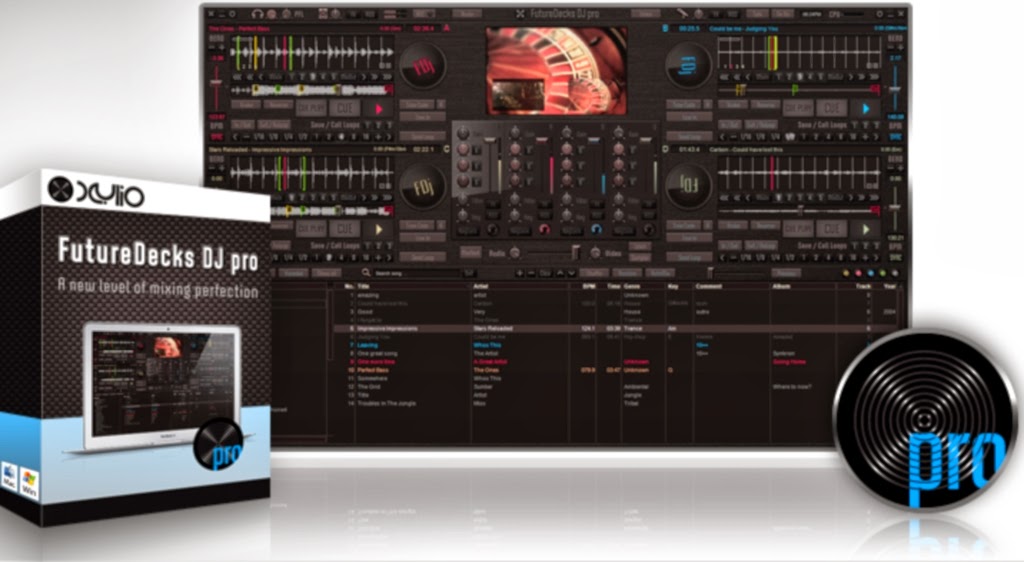
ဒီေကာင္ေလးကေတာ့ DJ ခ်စ္သူမ်ားအတြက္ latest professional DJ ေဆာ့စ္၀ဲေလးပဲျဖစ္ပါတယ္။
အသံသြင္းျခင္း ၊ အသံေတြကိုခြဲထုတ္ျခင္းႏွင့္ေပါင္းစပ္ျခင္းေတြလည္းျပဳလုပ္ႏိုင္ပါတယ္။ပါ၀င္တာေတြ
ကေတာ့ Mixer ,Video & Karaoke,Effects,External controllers, MIDI, Timecodes,
Media Library တို႔ပဲျဖစ္ပါတယ္။cdg+mp3, cdg zip စသည္karaoke files support လုပ္ေပး
ပါတယ္။m4v, mpeg/mpg, avi, flv, mp4, mov, စသည့္ video files support လုပ္ေပးပါတယ္
mp3, m4a, wav, aiff, ogg, cda, flac, au, wma စသည့္ audio files support လုပ္ေပးပါ
တယ္။ဖိုင္ဆိုဒ္ကေတာ့ 20Mb သာရွိျပီး Full ျဖစ္ေစဖို႔အတြက္ Keymaker ကိုထည့္သြင္းေပးထားပါတယ္။
ဒီေဆာ့စ္၀ဲေလးကိုေတာ့ Windows 7 / 8 မ်ားတြင္သာအသံုးျပဳႏိုင္ပါတယ္။ 

FutureDecks DJ pro is our flagship product, packed with the latest professional DJ features that answer the needs of both professional and aspiring DJs. FutureDecks DJ pro can easily be used by all manner of DJs, from bedroom DJs who enjoy creating their own mashups and mixes in the comfort of their home, to DJs that perform in clubs and other live performance conditions. Thanks to an impressive number of advanced and flexible features, there is nothing limiting your creative flow, other than your own creativity.


General

classic DJ setup with 2 or 4 decks, pro mixer and playlists
included 8 completely different user interfaces (skins) with
2/4 decks versions
fully manual or automatic mixing (one-click beat-matching)
record your mixes to MP3, WAV or AIFF


Decks

automatic BPM detection (grid like) with batch-mode function
instant seamless loops and hot loop points, AutoCue
automatic key detection (perfect for harmonic mixing)
vinyl simulation including scratch, pitch, reverse play, brake
pitch scaling for harmonic/key mixing
cue points + loops markers + mix in/out points on the track
position sliders
perceptual automatic gain
prev/next beat/bar (seamless skip function)
load the whole song in RAM memory for instant access
KeyLock (MasterTempo) with on/off selector, gradual pitch bend


Mixer

separate headphones output and song pre-listening
3-band EQ + Gain per channel (including on microphone)
advanced auto-mixing including Mix-In/Mix-Out (Cue In/Out)
points
analog input for microphone/turntables/CD-players, Talk-Over
advanced support for external mixers
ASIO/CoreAudio low-latency support
powerful 8-banks sample player (sampler)


Video & Karaoke

video mixing (including pitch, break, reverse, scratch on
video)
HD compatible
preview video decks separately
Karaoke CDG (cdg+mp3, zip) support


Effects

support for 3rd party VST and AudioUnits effects (AU)
cut-off low-pass and high-pass filters
built-in BPM-synched effects:
Flanger, Echo (delay), Phaser, Reverb, BeatWaw, Pan (not
available on all skins)


External controllers, MIDI, Timecodes

controllers supported natively (zero-configure) from:
Akai, American Audio, Beamz, Behringer, Beyond Music, Denon,
Faderfox,
Hercules, M-Audio, Numark, PCDJ, Reloop, Pioneer, Stanton,
Vestax, Zomo
timecoded vinyls/CD support (absolute + relative modes)
connect up to 8 MIDI / HID devices at the same time
MIDI and HID controllers scripting
additional MIDI IN with LEARN - assign knobs/switches any
function including fx parameters


Media Library

browsing system with unlimited lists, disk explorer,
database, favorites
iTunes browser integration
instant search for a track
Audio/Video/Karaoke filters
color markers to mark tracks from list
scan/import files/folders in the background
audio-cd support on Win/Mac (intelligent cd detection/loading)
audio files supported: mp3, m4a, wav, aiff, ogg, cda, flac,
au, wma
video files supported: m4v, mpeg/mpg, avi, flv, mp4, mov,
mkv, wmv
karaoke files supported: cdg+mp3, cdg zip


Minimum system requirements

Win: at least a 1.7 GHz system with Windows 7 / 8
additional requirements: 2Gb RAM, 500Mb free disk space.


Recommended configuration


Win: 2.0 GHz processor and 4 GB RAM
ATI or NVidia video card with at least 256MB video ram
a multichannel audio device (soundcard) for separate headphones and speakers audio outputs
optionally one or more hardware controllers (that might already include a multichannel soundcard)


use a fast machine (Intel Core i5/i7 processors recommended)
with plenty of RAM (4 GB or more)
a multi-channel high-quality audio device (soundcard) makes
for a much better sound


INSTALLATION

• You need WinRAR to extract the rar's files.
• Install
• Use keygen to generate unlock code


http://mm-knowledgeinfo.blogspot.com/2014/02/inpixio-photo-filters-and-effects.html 


Adobe Premiere Pro CS6 ကိုေတာင္းဆိုထားၾကတဲ့သူငယ္ခ်င္းေတြအတြက္တင္ေပးလိုက္ပါတယ္။
Full Version ျဖစ္ေအာင္ Crack ဖိုင္ေလးပါထည့္သြင္းေပးထားပါတယ္။၀င္းဒိုး 32/64 bit အားးလံုးအသံုး
ျပဳႏိုင္ပါတယ္။မိမိ၀င္းဒိုး bit ကိုေရြးျပီး Crack ဖိုင္ထဲက dll ကိုဘယ္လိုထည့္ရမလဲဆိုတာေဒါင္းေလာ့စ္ဖိုင္ထဲ
မွာေသခ်ာဖတ္ပါ။အင္စေတာမလုပ္ခင္ပထမဆံုးမိမိအင္တာနက္ကြန္နရွင္ကိုခဏပိတ္ထားေပးပါ။အင္စေတါ
လုပ္နည္းအဆင့္ဆင့္ကိုလည္းေသခ်ာအရင္ဖတ္ပါ။Photo/movie ေတြကိုအေကာင္းဆံုးတည္းျဖတ္ႏိုင္တယ္
ဆိုကိုေတာ့ေျပာစရာမလိုေတာ့ပါဘူး။ေအာက္မွာပံုေတြၾကည့္လိုက္ပါ။


Description:
Adobe® Premiere® Pro CS6 software combines incredible performance with a sleek, revamped user interface and a host of fantastic new creative features, including Warp Stabilizer for stabilizing footage, dynamic timeline trimming, expanded multicam editing, adjustment layers, and more. Ready to switch to the ultimate toolset for video pros?
Work natively with the latest mobile, DSLR, HD, and RAW formats; edit, trim, and adjust effects in real time; stabilize shaky footage; and enjoy a sleek, revamped user interface and expanded multicam support. Over 50 enhancements make switching to Adobe® Premiere® Pro CS6 software easy
Streamlined, highly intuitive user interface - See more of your video and less clutter thanks to a highly intuitive, customizable interface. New monitor panels include a customizable button bar; the new Project panel focuses squarely on assets and allows clips to be skimmed, scrubbed, and marked up for editing. A new audio track design, improved meters, and a revamped Mixer panel make working with sound easier than ever.
Enhanced Mercury Playback Engine - Work dramatically faster thanks to sweeping performance, stability enhancements, and support for NVIDIA Maximus dual-GPU configurations and certain MacBook Pro OpenCL-based AMD GPUs.† Adobe Mercury Transmit enhances integration with third-party I/O devices.
Fluid, high-performance editing workflow - Take advantage of the most requested editing enhancements, including over 50 new features to help editors switching NLEs move more comfortably to Adobe Premiere Pro.
Dynamic timeline trimming - Finesse your editing with precision using all-new advanced trimming tools. Trim clips your way — directly in the timeline via keyboard entry or dynamically in the Program Monitor using JKL shortcuts.
Warp Stabilizer effect - Easily stabilize a bumpy camera move or lock a shot automatically with the same powerful technology as in Adobe After Effects® software. The new GPU-accelerated Warp Stabilizer removes jitter and rolling shutter artifacts and other motion-related irregularities.
Expanded multicam editing - Quickly and easily edit multicam footage from as many cameras as you have on the shoot. Sync via timecode, switch between tracks in real time, and adjust color across multiple shots.
More intuitive Three-Way Color Corrector - Better manage the color in your projects with the more intuitive Three-Way Color Corrector for precise primary and secondary color correction. Instantly improve video image quality with Adobe Photoshop® style auto-correct functions.
New adjustment layers - Apply effects across multiple clips. Now you can create adjustment layers, similar to those in Photoshop and After Effects, to apply effects to clips on tracks below them. Easily create masks to adjust a selected area of a shot.
Improved, customizable monitor panels - Work the way you want and edit more fluidly. A less cluttered, customizable interface lets you focus on your media by letting you choose which buttons to show or hide in the monitor panels.
Even faster Project panel workflows - View, sort, and arrange media easier than ever with the redesigned Project panel. Edit faster with the ability to scrub and skim clips, set in and out points, and resize clip thumbnails.
Native DSLR camera support - Work natively with the footage shot with the latest video cameras, including ARRI Alexa, Canon Cinema EOS C300, RED EPIC®, and RED Scarlet-X cameras. Native support lets you start editing immediately, without transcoding or rewrapping the footage.
Enhanced, flexible audio tracks - Freely combine and pan mono and stereo clips. For more advanced audio workflows, new Multichannel master and Adaptive track types enable total audio routing flexibility and easy export to multichannel file types.
Adobe Prelude CS6 integration - Use Adobe Prelude to efficiently log footage, add comments and markers, and create rough cuts that can be brought into Adobe Premiere Pro. Comments and markers are associated with the media, making it easy to organize.
Adobe SpeedGrade CS6 integration - Easily export your Adobe Premiere Pro sequences into SpeedGrade CS6 for a complete finishing solution. Easily handle grading tasks like matching shots and creating consistent nuanced color to visually enhance your projects.
Uninterrupted playback - Edit, apply filters, and adjust their parameters, all during playback. Dynamically preview video by looping playback and adjusting parameters on the fly, thanks to the Mercury Playback Engine. (May require a supported GPU.)
Rolling Shutter Repair effect - Easily repair media with rolling shutter artifacts such as wobble and skew. Based on technology in the Warp Stabilizer, this powerful effect can be applied without stabilization and offers enhanced controls.
New Preset Browser - Access commonly used settings immediately using the new Preset Browser in Adobe Media Encoder CS6. Organize presets by category, set favorites, and customize your most frequently used encoding presets.
Performance and stability improvements - Encode video faster when outputting a single source to multiple outputs with Adobe Media Encoder CS6. Get a significant performance boost when using watch folders on a network.
New RED EPIC and RED Scarlet-X support - Take advantage of new support for RED EPIC 5K and RED Scarlet-X footage that lets you import it directly into Adobe Media Encoder CS6 for transcoding to HD and SD formats.
More popular device and format presets - Save time and encode content more easily by using Adobe Media Encoder presets that help ensure your video looks great on widely used output formats and devices, including mobile devices and HDTV.
New 64-bit Adobe Encore CS6 - Speed up your authoring workflow and get rock-solid performance and stability with Adobe Encore® CS6, now natively 64 bit. Open and save projects faster, and get dramatic performance working on demanding projects.
Faster MPEG import - Bring MPEG assets into Encore CS6 even faster as multiple import processes happen simultaneously in the background.
Pixel aspect ratio correction in previews - View the correct pixel aspect ratio when previewing DVD simulations, thanks to new pixel aspect ratio correction in Encore CS6.
Enhanced DVD and Blu-Ray Disc authoring - Get even more functionality when authoring DVDs and Blu-ray discs. New 64-bit Encore CS6 adds support for 8-bit color for highlight buttons and menu color quality enhancements and lifts the 99-slide restriction for Blu-ray slide shows.
Enhanced web DVD authoring - Create powerful web DVD experiences that replicate all the functionality of their Blu-ray Disc counterparts, thanks to new web DVD support for pop-up menus, multipage menus, and looping menu playback.
System requirements Windows
•Intel® Core™2 Duo or AMD Phenom® II processor; 64-bit support required
•Microsoft® Windows® 7 with Service Pack 1 (64 bit)
•4GB of RAM (8GB recommended)
•4GB of available hard-disk space for installation; additional free space required during installation (cannot install on removable flash storage devices)
•Additional disk space required for preview files and other working files (10GB recommended)
•1280x900 display
•OpenGL 2.0–capable system
•7200 RPM hard drive (multiple fast disk drives, preferably RAID 0 configured, recommended)
•Sound card compatible with ASIO protocol or Microsoft Windows Driver Model
•DVD-ROM drive compatible with dual-layer DVDs (DVD+-R burner for burning DVDs; Blu-ray burner for creating Blu-ray Disc media)
•QuickTime 7.6.6 software required for QuickTime features
•Optional: Adobe-certified GPU card for GPU-accelerated performance
•This software will not operate without activation. Broadband Internet connection and registration are required for software activation, validation of subscriptions, and access to online services.* Phone activation is not available.
Languages : English, French, Italian, German, Spanish, Portoguese (BR), Japanese, Korean
မွတ္ခ်က္။ ။ေဒါင္းေလာ့စ္ဆြဲျပီးေသာဖိုင္မ်ားကို Part 1 ဆိုလွ်င္ေဒါင္းျပီးတာနဲ႔ Part 1 ဟု
နာမည္ေျပာင္းေပးပါ။ျပီးမွဖိုင္ျဖည္ပါ။ဖိုင္ျဖည္နည္းမသိပါက ဒီမွာႏွိပ္ျပီး အရင္၀င္ၾကည့္ပါ။


PART 1  |  PART 2  |  PART 3  |  PART 4

(OR)


PART 1  |  PART 2  |  PART 3  |  PART 4


4Videosoft Media Toolkit ေဆာ့စ္၀ဲေလးကဘာေတြလုပ္ႏိုင္လဲဆိုရင္ DVD Ripper Platinum, Video Converter Platinum, iPod Manager , iPhone Ringtone Maker စသည္တို႔ကိုလြယ္ကူစြာ convert လုပ္ေပးႏိုင္တဲ့အျပင္ DVD နဲ႔ video file ကေန video and audio ေတြကို formats လုပ္ႏိုင္ျခင္း၊ video, audio, photos, ေတြကို iPod/iPhone/iPad ဆီသို႔ transfer files လုပ္ႏိုင္ျခင္း ၊ DVD disc/DVD folder/ISO file အျဖစ္ထုတ္လုပ္ႏိုင္ျခင္း ၊ iPhone 5S/5C, latest iOS 7 and iTunes တို႕ကိုလည္း Support လုပ္ေပးႏိုင္ျခင္း ၊ AVI, MPEG, H.264, MOV, M4V, and HD videos စသည္ျဖင့္တည္းျဖတ္
ႏိုင္ပါသည္။ဖိုင္ဆိုဒ္ 87Mb ရွိျပီး၀င္းဒိုးအားလံုးအသံုးျပဳႏိုင္သည္။အင္စေတာလုပ္နည္းကိုေဒါင္းေလာ့စ္ဖိုင္
ထဲမွာေသခ်ာဖတ္ပါ။

4Videosoft Media Toolkit platinum features four powerful media software: DVD Ripper Platinum, Video Converter Platinum, iPod Manager , iPhone Ringtone Maker, with which you can easily convert any DVD and video file to other video and audio formats, transfer files (video, audio, photos, etc.) between iPod/iPhone/iPad and computer, and make iPhone ringtone for nay version iPhone device.

The Media Toolkit Ultimate provides you the best solution of DVD Ripper Platinum, Video Converter Platinum, DVD Creator, DVD Copy and iPhone Transfer Platinum. Once owing this comprehensive software, you can not only convert DVD and video to any video format you want, but also can transfer files including between iPhone/iPad/iPod and computer. Moreover, this Media Toolkit Ultimate has the ability to copy DVD and burn any video to DVD disc/DVD folder/ISO file.

Highlights:
- Convert DVD and video files
- Transfer files between iPhone/iPad/iPod and computer
- Create customized DVD disc/DVD folder/ISO file
- Copy DVD lossless
- Support iPhone 5S/5C, latest iOS 7 and iTunes


Convert DVD/Video to Any Video
- 4Videosoft DVD Ripper platinum is capable of ripping DVD to any popular video and audio formats, like MP4, AVI, WMV, AAC, etc.
- 4Videosoft Video Converter Platinum enables you to convert all videos such as AVI, MPEG, H.264, MOV, M4V, and HD videos to any other video and audio formats for your enjoyment.
- You can also use them to extract audio file from any DVD and video to save as AAC, AC3, MP3, M4A, MP2, WAV, WMA audio formats.

Burn Video to DVD Disc/DVD Folder/ISO file
- The DVD Creator can help you create customized DVD disc/DVD folder/ISO file from several video files you select with high quality.
- You are enabled to customize your DVD by setting special DVD menu, including the DVD background picture, background music, text content, etc. You can also add audio track and subtitle for the DVD.

Copy DVD Freely
- The DVD Copy can help you copy DVD in 1:1 ratio or compress DVD-9 to DVD-5 perfectly.
- You can burn local DVD folder or ISO image files to DVD disc in high quality.

Transfer Files between iPhone/iPad/iPod and PC
- The iPhone Transfer software allows you to transfer iPhone files to computer or iTunes directly and safely.
- You can also add the local files such as video, audio, phots, ringtone, etc. to iPhone for your enjoyment.
- This Media Toolkit Ultimate can also help you transfer files among iPhone and other Apple devices.

Powerful Editing and Setting Functions
- 4Videosoft Media Toolkit Ultimate allows you to adjust the video Brightness, Contrast, Saturation, Hue and Volume, and even check Deinterlacing to upgrade your video quality.
- This Media Toolkit Ultimate has the trim function, which helps you get any time-length video or audio clips from your video sources.
- With the Media Toolkit Ultimate, you can adjust video play region to get the perfect playing screen for your player.
- Merge your selected DVD chapters/titles or video sources into one file and Personalize your video by putting a watermark in the form of text or image.
- You can add your preferred audio track and subtitle for the converted video or created DVD.
- It enables you to adjust the video settings and audio settings, including Video Resolution, Video Bitrate, Frame Rate, Encoder and Audio Channels, Sample Rate, Encoder, Audio Bitrate.

Convenient and Efficient
- 4Videosoft Media Toolkit Ultimate is highly compatible with all popular players, including the new iPhone 5S/5C.
- You can preview the original DVD and video with the built-in player and take snapshot of your favorite images.
- The Media Toolkit Ultimate provides you with the best converting, burning and transferring speed with high quality.

Supported OS: Windows 8, Windows 7, Windows Vista, Windows XP (SP2 or later)


http://adfoc.us/14251339182977 
(or)

http://adfoc.us/14251339186375


Monday, 3 March 2014

Movie Label ေတြကို title or barcode ႏွင့္ Catalog စသည္တို႔ျဖင့္ media ဖိုင္ျဖစ္ေသာ (DVD, Blu-ray, VHS, LD, Divx, စသည္တို႔ကိုလြယ္ကူစြာ Edition လုပ္ႏိုင္ပါတယ္။Export  formats အျဖစ္ HTML, XML, PDF, Excel, စသည္တို႔ကိုလုပ္ႏိုင္ပါတယ္။number of databases ကိုလည္းလိုခ်င္ေသာ size ကို
Create  လုပ္ႏိုင္ပါတယ္။ဖိုင္ဆိုဒ္ကေတာ့ 25Mb ပဲရွိပါတယ္။Full ျဖစ္ေစဖို႔အတြက္ေဒါင္းေလာ့စ္ဖိုင္ထဲမွာ
Crack ဖိုင္ကိုထည့္သြင္းေပးထားပါတယ္။အင္စေတာလုပ္နည္းကိုဖိုင္ထဲမွာဖတ္ပါ။

Do you remember when you bought your first DVD? Relive that feeling everytime you get a new movie with Movie Label 2014. Movie Label is a better kind of movie database for any size movie collection. Remember, your movie collection is an investment so make sure you treat it like one. Movie Label makes manging movies a breeze for thousands of happy users around the world. After you've bought Movie Label you will wonder how you ever lived without it. And rest assured, you will never outgrow it.

Features:
- Quickly get your movie library organized by typing the title or barcode.
- Catalog any type of media (DVD, Blu-ray, VHS, LD, Divx, etc).
- Scan your hard drive to find movie files and add them to your collection.
- Keep track of movies on loan with the built-in loan manager.
- Search and sort your collection with one click.
- Print reports and watch a variety of statistics.
- Export to various formats (HTML, XML, PDF, Excel, etc). (Pro Edition Only)
- Export to Netwalk Movies (for iPhone/iPod/iPad) and bring your collection with you.
- Keep a list of wanted and ordered items.
- Create any number of databases of any size.
- Touch gesture support.


http://bc.vc/RWMdn2 
(or)

http://adfoc.us/14251339066899 
 

Sunday, 2 March 2014

MAGIX Video Pro X6 full version

ဒီ magix video pro x6 ကိုသံုးခ်င္းတယ္သူတို႔အတြက္ က်ေနာ္ရွာေဖြျပီးတင္ေပးလိုက္တယ္ သူကေတာ့ Pro အဆင့္ထိ ျဖစ္ေအာင္ ဖန္တီႏိုင္ပါတယ္တဲ့..ယေန႕ လူငယ္ေတြၾကားထဲမွာ ေခတ္စားေန တဲ့magix video pro ရင္လည္း ဒီ Software နဲ႕ျပဳလုပ္ထားတာပါတဲ့ခင္မ်ာ..
Keygen အသံုးျပဳနည္းကိုေတာ့ ရွင္းမျပေတာ့ပါဘူးေနာ္..ကိုယ္တိုင္ေလ့လာၿပီး အသံုးျပဳပါ..ရွင္းမျပဘူး ဆိုတာကလည္း ကိုယ္တိုင္လုပ္တတ္တဲ့အက်င့္ရေအာင္လို႕ပါ..လုပ္တတ္သြားၿပီဆိုလိုကေတာ့ ဘယ္ Software ကိုမဆို Crack ခ်ိဳးတတ္သြားပါလိမ့္မယ္..အေတြးအျမင္ရသြားပါလိမ့္မယ္.. Download ရယူႏိုင္ပါၿပီခင္မ်ာ။

Miloshare Solidfiles d-h.st zippyshare


 မူရင္း ဆိုဒ္ကေတာ့ ဒီမွာ ၾကည့္ေပးပါ။(Original Site is Here)
Description:
Kashizone - MAGIX Video Pro X6 is an awful adult video change the Band-Aid -oriented show different requirements of users aggressive and capable . And a variety of award-winning video workstation offers an unrivaled range of accoutrement capable of modifications and extensions to the basic audio dubbing adult plentiful . Optimal plan workflow and various accoutrement to achieve an agreement that will face absolute change around your eyes to reality . State-of- the-art technology agenda , avant-garde and functions , and the accession of years of acquaintance in the area capable of video and audio to an agreement yet able to integrate the effects of full and absolute vision. MAGIX Video Pro X6 appearance 3 -point cutting action that makes the inclusion of video clips in the timeline easier alike.
Choose the position you're in the zone amendment ambition to admit clip . Then simply add the alpha position to the book that the appetite to import . The computer automatically calculates the credibility of Cut and completely fills the gaps in the timeline.
MAGIX Video Pro X6 Serial key
MAGIX Video Pro X6 is absolutecomputer applying a Band-Aid for a mechanism capable and video production . This video booth to change the multi- award-winning show , which is heading the different requirements of users capable , and offers an unrivaled scope of post-production tools capable . Improve performance , and options for change are abundant and years of acquaintance in the area of advancedcomputer agreement to develop applications capable of after effects in the eyes of complete and absolute and workflow able to collect able to change the video with the richness of Use . Now with 64-bit support.
App Info:
Title: MAGIX Video Pro X6 13.0.3.24
Size: 327 MB
Publisher: Magix
Release Date: 2014-02-27
Submit Date: 2014-02-27
Supported OS: Windows Xp / Vista / 7 & Windows 8


အားလံုးပဲအဆင္ေျပႏိုင္ပါေစ